

Industry challenges
Protecting layout and IP assets while enabling efficient AI-assisted R&D
Layouts and IP require protection, AI requires internet access, and EDA and simulation require computing resources. The R&D environment must support all three.
Must enable | AI and collaboration
Internet access for AI and open-source resources
Large models and open-source components must be obtained online without directly connecting to the internal network.
Computing resources for EDA and simulation
Memory, CPU frequency and graphics requirements grow with design scale and affect design cycles.
Access across sites and external partners
Design centers, foundries, packaging and testing sites, and external partners need access to shared environments.
Excessive restrictions slow design verification, AI adoption and collaboration across sites.
Must protect | Layout and IP assets
Strict internal and external network boundaries
The R&D intranet and internet remain separate; AI resources are introduced through a one-way channel.
High-value layouts and IP assets
GDSII layouts, IP cores and process parameters require project-scoped controls.
Traceable data exchange
External tape-out work and deliverable handovers require clear scope and accountability.
Once access is relaxed for convenience, copies of layouts and IP become difficult to retrieve.
Solution
Controlled cloud computing architecture: centrally protect layouts and IP while running EDA and AI collaboration within defined boundaries
EDA and simulation run on dedicated Compute Blades in the data center. The R&D intranet and internet remain physically isolated, while engineers at multiple sites access assigned environments through Software Client Terminals (SCT).
Core scenarios and solution features
EDA and structural design software
Dedicated Compute Blades with computing resources matched to each task
Layouts and IP remain centralized; no business data is stored at the endpoint
Explore this scenarioControlled access to high-performance servers
Access existing servers through CPC
Endpoints receive display output; data remains in the machine room
Network isolation and AI tool access
Keep internal and external networks isolated; import through a one-way security gateway
Controlled, auditable use of AI and open-source resources
Collaboration across sites and mobile work
Software Client Terminals (SCT) connect to assigned environments
Use the same environment across sites; validate domestic-platform compatibility for each project
Explore this scenarioNo endpoint layout storage · Dedicated computing resources · Separate internal and external networks · Auditable operation
Typical deployment
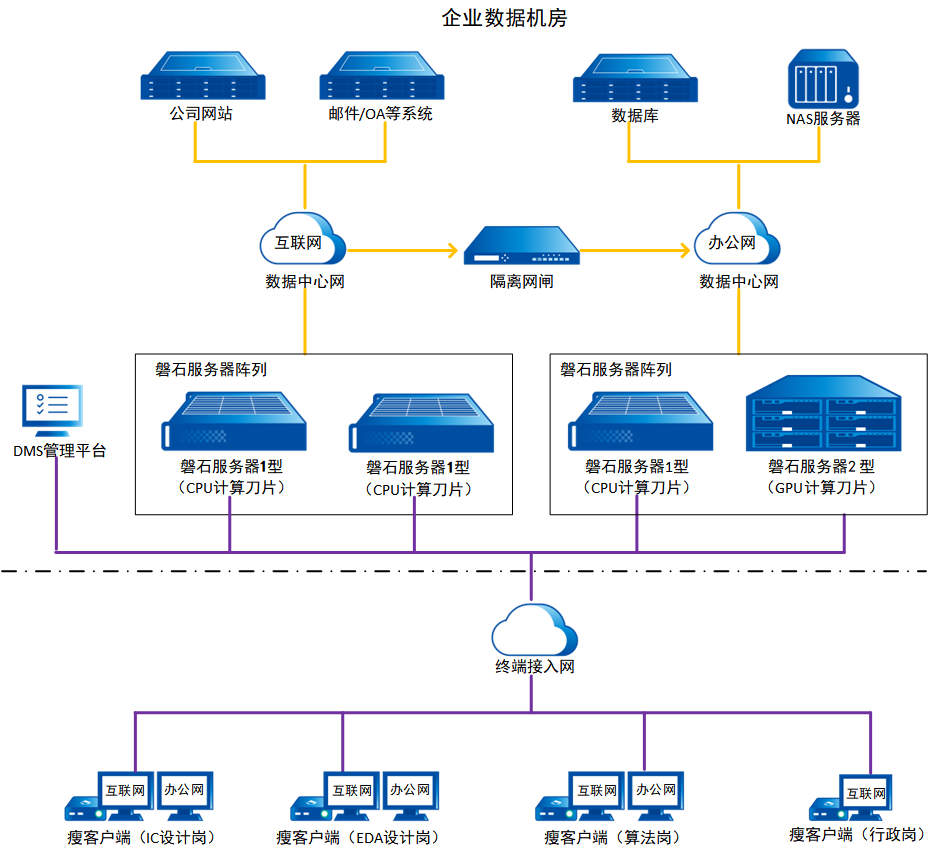
The company website and email / OA systems are on the Internet side; the database and NAS are on the office side. Each domain has its own PANSTONE Server array, with approved exchange through the isolation gateway.
CT Client Terminals serve IC design, EDA design and algorithm roles. The office side provides CPU and GPU Compute Blades, while administrative roles use their authorized environments.
PANSTONE DMS (Desktop Management System) manages the corresponding server resources. The terminal access network carries authorized display and interaction; computing and business data stay in the data room.
Solution value
Protect layouts and IP while supporting EDA development and AI collaboration
Centrally manage design assets, EDA environments, terminals and accounts to support collaborative R&D across design centers, foundries, and packaging and testing sites.
Centrally controlled layouts and IP
GDSII layouts and IP cores remain centralized; no business data is stored at the endpoint.
Smoother dedicated computing
Configure CPU, GPU and large memory resources as needed.
Safer work across networks
Physically isolate internal and external networks, with controlled use of AI.
Continuous R&D across sites
Software Client Terminals (SCT) connect directly to assigned environments.
Simpler operations with domestic-platform readiness
Deliver images in batches and validate domestic-platform compatibility for each project.