

Industry challenges
Control clinical information while supporting departments and hospital sites
Records, images, laboratory and research materials require role- and department-scoped access. Plan multi-network work, imaging, shifts and multi-site collaboration around clinical workflows and validated devices.
Clinical environments and specialist workplaces
Networks and shifts
Clinical, office, research and internet work coexist; departments and shifts need explicit access boundaries.
Distributed specialist workstations
Large images, analysis tools and specialist devices increase configuration and recovery work when maintained separately.
Institutional collaboration and AI task boundaries
Multi-site collaboration
Hospitals, branches and care networks need to collaborate within institution-, role- and data-scoped access.
Agent task boundaries
Agent file operations and environment changes can affect staff workplaces; patient-data use and returned output require controls.
Solution
Independent environments by domain and role, with specialist resources matched to actual tasks
Host imaging, analysis and office workloads in approved network zones. Access assigned environments and validate specialist software and devices. Manage supported resources; use approved clinical systems and data paths between sites.
Core scenarios and solution features
Separate environments by domain and role
Provide independent computing under the hospital network plan and update access as departments and roles change.
Size for actual imaging tasks
Match CPU, GPU, memory and storage to applications, image formats and concurrency; validate specialist devices.
Scope institutional collaboration
Use approved clinical systems, interfaces or exchange workflows for necessary data, with centralized maintenance and restoration.
Separate staff and Agent execution
Assign independent environments, limit data and tools, and require staff review before using outputs.
Role-scoped access · Validated specialist devices · Controlled collaboration
Typical deployment
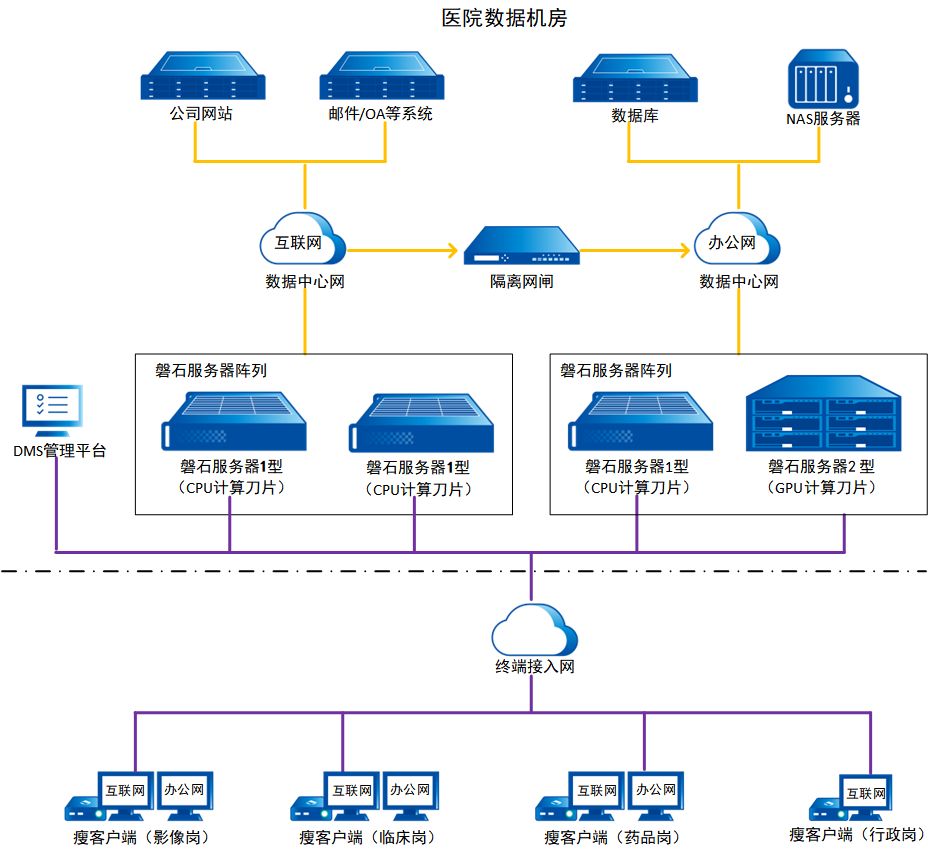
Internet and office domains connect to separate PANSTONE Server arrays. The office side holds the database and NAS, with CPU and GPU Compute Blades matched to roles.
An isolation gateway separates Internet and office networks. Approved exchanges follow the designated path; terminal access does not bridge the business networks.
CT Client Terminals serve imaging, clinical, pharmacy and administrative roles through the terminal access network. DMS Desktop Management System manages the corresponding server resources.
Solution value
Coordinate patient information, clinical workplaces and hospital operations
Controlled patient and clinical data
Use and manage records, images, laboratory and research materials in authorized environments, reducing exposure from local copies, shared shifts and staff changes.
Smoother multi-network clinical work
Provide environments by network domain, department and role, with controlled exchange to reduce terminal switching and preserve access boundaries.
Validated specialist imaging workplaces
Match compute resources to imaging, visualization and analysis, validating compatibility and performance against actual workflows.
Controlled people–AI collaboration
Run staff and Agents separately, transfer necessary data through controlled paths and review outputs to limit the impact of Agent mistakes.
Efficient multi-site operations
Combine central management, institutional authorization and controlled collaboration for hospital networks and shifts, reducing distributed endpoint maintenance.