

Industry challenges
Coordinate group-wide work while keeping assets and access under control
Coordinate engineering and multi-network work across headquarters, subsidiaries, factories and field sites. Scope data by organization and role, with designated contractor environments.
Branches and engineering assets
Complex multi-network branches
Headquarters, regions, factories and field sites use separate business networks, increasing switching and remote-maintenance work.
Scattered engineering compute and files
Distributed engineering, simulation and visualization workstations scatter drawings, models and results across endpoints.
Staff, AI and supply-chain collaboration
Shared staff and Agent environments
Agent file and environment operations can affect staff workplaces and engineering tasks.
Industry-chain collaboration scope
Suppliers and project teams need necessary environments and data without broad access to the group network.
Solution
Plan central computing and local workplaces separately, with shared operations policies
Host engineering, simulation and office work by domain and size resources by task. Use DPC for suitable local multi-network roles and validate site interfaces and peripherals. Manage supported resources, standard images, remote support, training and access retirement.
Core scenarios and solution features
Separate compute and unify branch access
Map independent instances and access paths to the group network plan and update permissions as organizations, roles and projects change.
Organize engineering resources and data
Size resources for design, simulation and visualization, authorize tools and files by project and migrate in line with delivery plans.
Run staff and Agent tasks separately
Use independent environments and approved exchange paths and review output before business use.
Coordinate operations and project collaboration
Maintain supported images, software and policies, provision contractor project environments and plan remote recovery and access retirement.
Separate environments · Project-scoped access · Central operations
Typical deployment
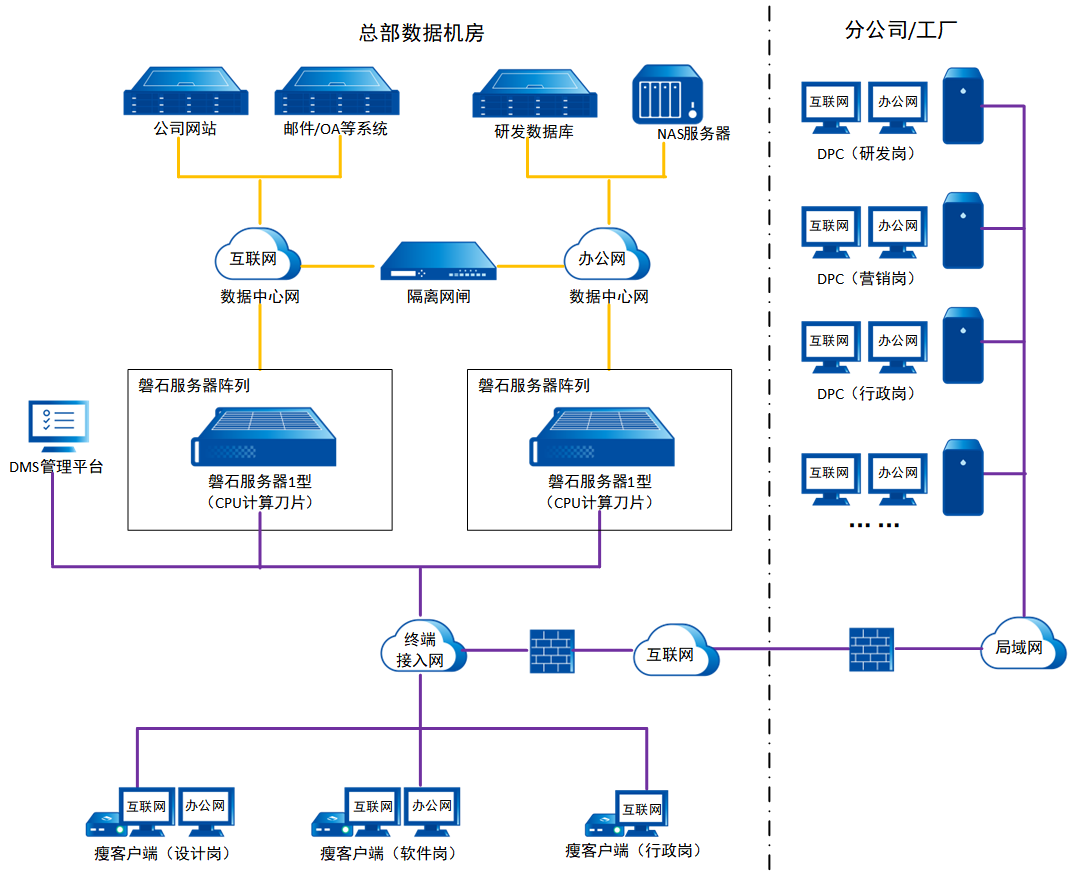
Headquarters has separate CPU PANSTONE Server arrays for Internet and office domains, with the R&D database, email / OA and NAS deployed as shown.
R&D, marketing and administrative roles at subsidiaries / factories use DPC Dual-Host PCs with two independent local environments.
CT Client Terminals serve headquarters design, software and administrative roles. Branches use the firewall-protected path shown, with DMS Desktop Management System on the headquarters management side.
Solution value
Manage industrial assets, branch workplaces and supply-chain collaboration together
Controlled industrial assets
Use drawings, models, process data, code and business data in controlled compute and storage environments, reducing copies and exposure during staff changes.
Efficient multi-network branch work
Let headquarters, regions, subsidiaries, factories and sites access assigned environments by domain and role, reducing device switching while retaining boundaries.
Validated engineering workplaces
Match resources to design, simulation and visualization, manage software environments centrally and validate performance using representative project tasks.
Controlled people–AI collaboration
Use separate staff and Agent instances, transfer necessary data through controlled paths and review outputs to limit the impact of Agent mistakes.
Managed group operations and supply-chain collaboration
Combine central management, project authorization and controlled exchange to reduce branch maintenance and support cooperation with suppliers, contractors and project teams.