

Industry challenges
Teaching and research need open sharing, while environments, data and collaboration boundaries must remain controlled
Large training labs, high-performance research computing and remote university–industry collaboration increase pressure on environment recovery, resource management and data boundaries together.
Must share efficiently | Efficient teaching and research
Training environments need rapid delivery
Multiple courses, classes and disciplines require frequent software-environment changes
Advanced research needs matched computing resources
CPU, GPU, professional software and research-project environments need reproducibility
University–industry collaboration needs remote access
Students, faculty and industry mentors need designated tools and information
Overly strict controls slow courses, research collaboration and industry–education integration.
Must also control | Research outputs, data and permission boundaries
Endpoint-operations pressure keeps increasing
Frequent student use makes environment drift and after-class recovery hard to manage consistently
Research outputs must not spread with endpoints
Data, code, models and paper materials need central retention
Collaboration projects require least-privilege access
Establish boundaries by course, research topic, person and collaboration scope
Relaxing access for convenience increases data-dispersion and accountability risks.
Solution
Controlled cloud computing architecture: unified support for training, research and university–industry collaboration
Course environments, professional software and research outputs are centralized in the university data center; endpoints only provide display and interaction, with authorization by course, research topic and project.
Core scenarios and solution features
Central training-lab operations
Course environments prepared and switched as needed
After-class recovery, account withdrawal and remote support
Advanced laboratory R&D
CPU, GPU and professional software configured by research topic
Data, models and code centrally retained
Explore this scenarioSecure remote university–industry office work
Independent instances and least-privilege access assigned by project
Controlled access, information exchange and withdrawal at completion
Explore this scenarioNo endpoint data storage · Reusable environments · Permissions configured as needed
Typical deployment
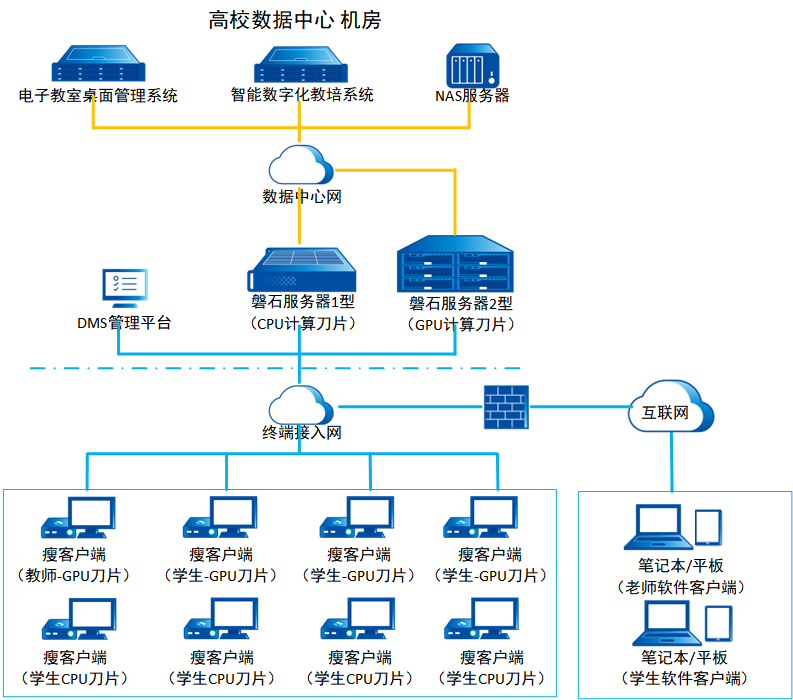
Classroom desktop management, digital teaching systems and NAS connect to the data-center network. PANSTONE Server resources provide CPU and GPU Compute Blades for courses.
Teachers and students use CT Client Terminals, with GPU and CPU resources allocated as shown. DMS Desktop Management System manages the corresponding server and access environment.
Classroom terminals connect through the terminal access network. Teachers and students can also connect remotely through a firewall-protected path using SCT Software Client Terminals.
Solution value
Make teaching and research resources easier to use, with better control of research outputs and university–industry collaboration
Centrally manage course images, research environments, endpoints and accounts to support stable teaching, research and collaborative projects throughout the university.
More efficient training operations
Course images, endpoints and accounts centrally managed.
More usable research environments
Computing resources and software environments configured by research topic.
Better-controlled research outputs
Data, code and models centrally retained.
Safer university–industry collaboration
Independent environments, controlled access and information exchange.
More orderly university-wide resources
Unified resource and policy management across campuses.